
Update Frames
New Frames versions bring fixes and new features. Updating usually takes a couple of minutes, but some versions also need small changes in your project. This page tells you which ones.
Step 1: Find your version and the latest one
Section titled “Step 1: Find your version and the latest one”-
Your version is in
buildSrc/src/main/java/Versions.kt:const val frames = "x.x.x" -
The latest version is:
(ignore the
v).
Step 2: Apply the changes for each version, in order
Section titled “Step 2: Apply the changes for each version, in order”Look at the list below. Starting from the version right after yours, apply each version’s changes, one version at a time, until you reach the latest.
For example, if you’re on 2.3.0 and the latest is 2.3.7, apply 2.3.1, then 2.3.2, and so on. If a version isn’t listed, it doesn’t need any changes, so skip it.
Most entries link to a commit, a page on GitHub that shows what changed in each file. It looks like this:
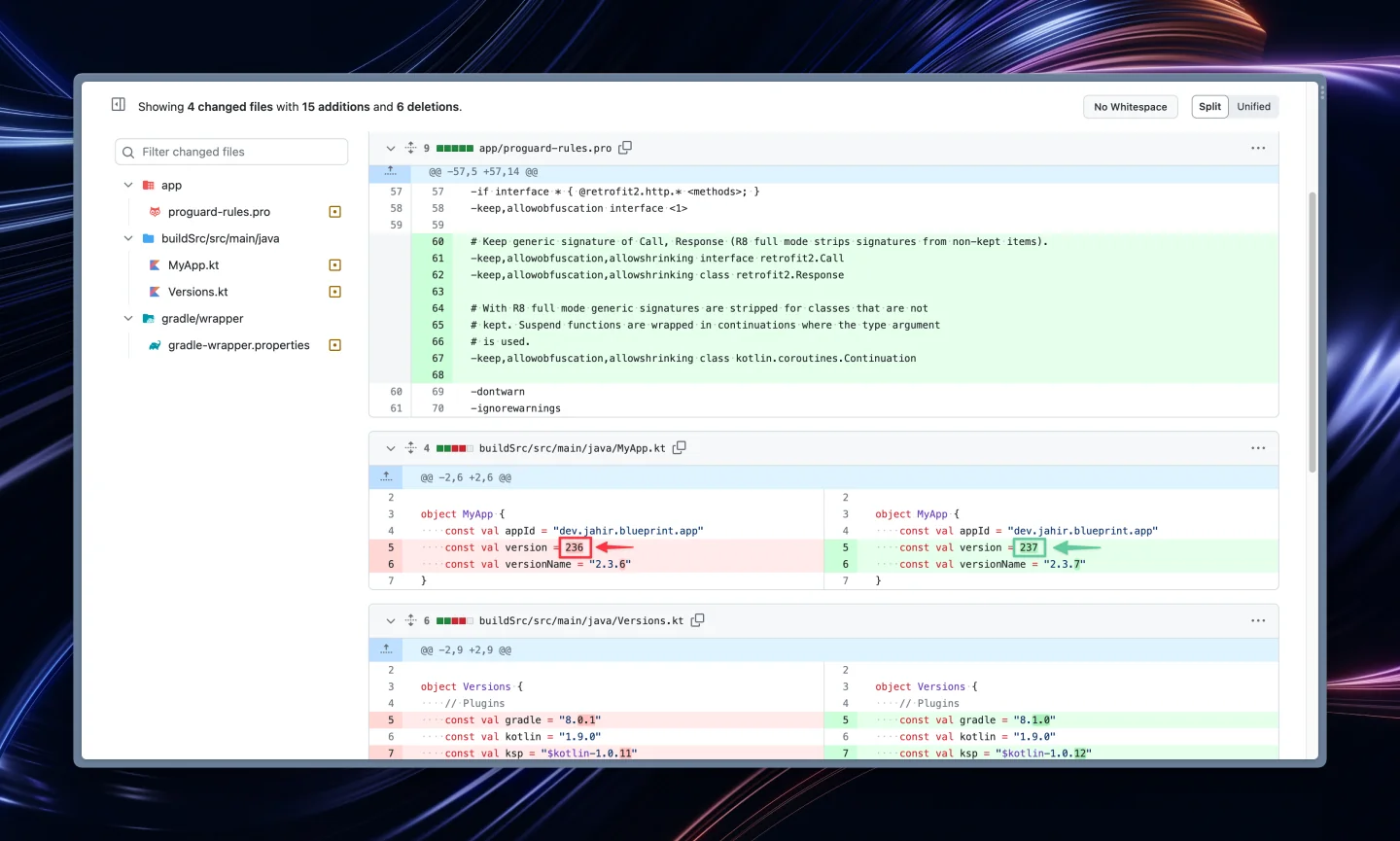
- Red lines were removed. Delete them from your file.
- Green lines were added. Add them to your file.
- When only part of a line changed, that part is highlighted in a darker color.
Make the same changes in your project. You can skip changes to files you’ve customized with your own content, like icons, wallpapers or texts, unless the entry says otherwise.
Step 3: Update the version number
Section titled “Step 3: Update the version number”Set frames in Versions.kt to the latest version, then click File → Sync Project with Gradle Files and run your app to check that everything works. 🚀
Stuck on a version? Ask in the Discord server, and mention which version you’re updating from.
Changes for each version
Section titled “Changes for each version”v3.8.0
Section titled “v3.8.0”Apply the changes in this commit.
v3.7.1
Section titled “v3.7.1”Apply the changes in this commit.
v3.7.0
Section titled “v3.7.0”Apply the changes in this commit.
v3.6.4
Section titled “v3.6.4”Apply the changes in this commit.
v3.6.3
Section titled “v3.6.3”Apply the changes in this commit.
v3.6.2
Section titled “v3.6.2”Apply the changes in this commit.
v3.6.1
Section titled “v3.6.1”Apply the changes in this commit.
v3.6.0
Section titled “v3.6.0”Apply the changes in this commit.
v3.5.8
Section titled “v3.5.8”Apply the changes in this commit.
v3.5.7
Section titled “v3.5.7”Apply the changes in this commit.
v3.5.6
Section titled “v3.5.6”Apply the changes in this commit.
v3.5.5
Section titled “v3.5.5”Apply the changes in this commit.
Note
The new files in assets are only samples. You don’t need to copy them.
v3.5.1
Section titled “v3.5.1”Apply the changes in this commit.
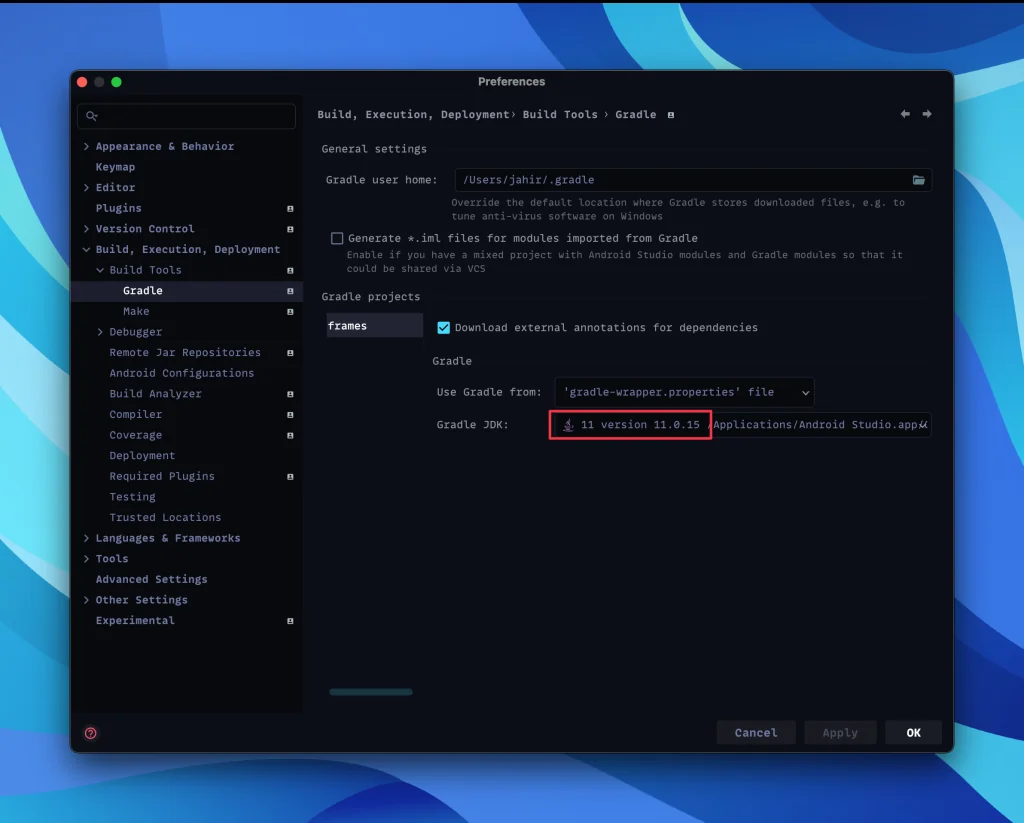
Also update the Gradle settings in Android Studio, as shown here:
v3.5.0
Section titled “v3.5.0”Apply the changes in these commits.
v3.4.9
Section titled “v3.4.9”We found an error in this release and therefore removed it. If youʼre updating from version 3.4.8 or older, skip version 3.4.9 entirely and see above for how to update to version 3.5.0. If you updated to version 3.4.9 while it was available, we recommend you update to version 3.5.0. See above for how to do so, but keep in mind that youʼve already applied most of the changes required. Youʼll only have to change Versions.kt.
v3.4.8
Section titled “v3.4.8”Apply the changes in this commit.
v3.4.7
Section titled “v3.4.7”Apply the changes in this commit.
v3.4.6
Section titled “v3.4.6”Apply the changes in this commit. You can ignore the changes in the .idea folder.
v3.4.5
Section titled “v3.4.5”Apply the changes in this commit.
v3.4.4
Section titled “v3.4.4”Apply the changes in this commit.
v3.4.3
Section titled “v3.4.3”Apply the changes in this commit.
v3.4.2
Section titled “v3.4.2”Apply the changes in this comparison.
v3.3.7
Section titled “v3.3.7”Apply the changes in this commit.
v3.3.5
Section titled “v3.3.5”Apply the changes in this commit.
v3.3.4
Section titled “v3.3.4”Apply the changes in this commit.
v3.3.3
Section titled “v3.3.3”Apply the changes in this commit.
v3.3.1
Section titled “v3.3.1”Apply the changes in this commit.
v3.2.1
Section titled “v3.2.1”Apply the changes in this commit.
v3.1.3
Section titled “v3.1.3”Apply the changes in this commit.
v3.1.2
Section titled “v3.1.2”Review the settings in /app/src/main/res/values/dashboard_setup.xml.
v3.0.4
Section titled “v3.0.4”Apply the changes in these commits: 1, 2, 3.
Older versions
Section titled “Older versions”Show older versions
Still on Frames 2? See this guide to update it. We recommend moving to Frames 3.
Made by Jahir Fiquitiva. Questions? Ask in the Discord server.